
Audio / MIDI Settings
When running FFOSSO in standalone, the Audio/MIDI settings let you set the audio output device and MIDI inputs.
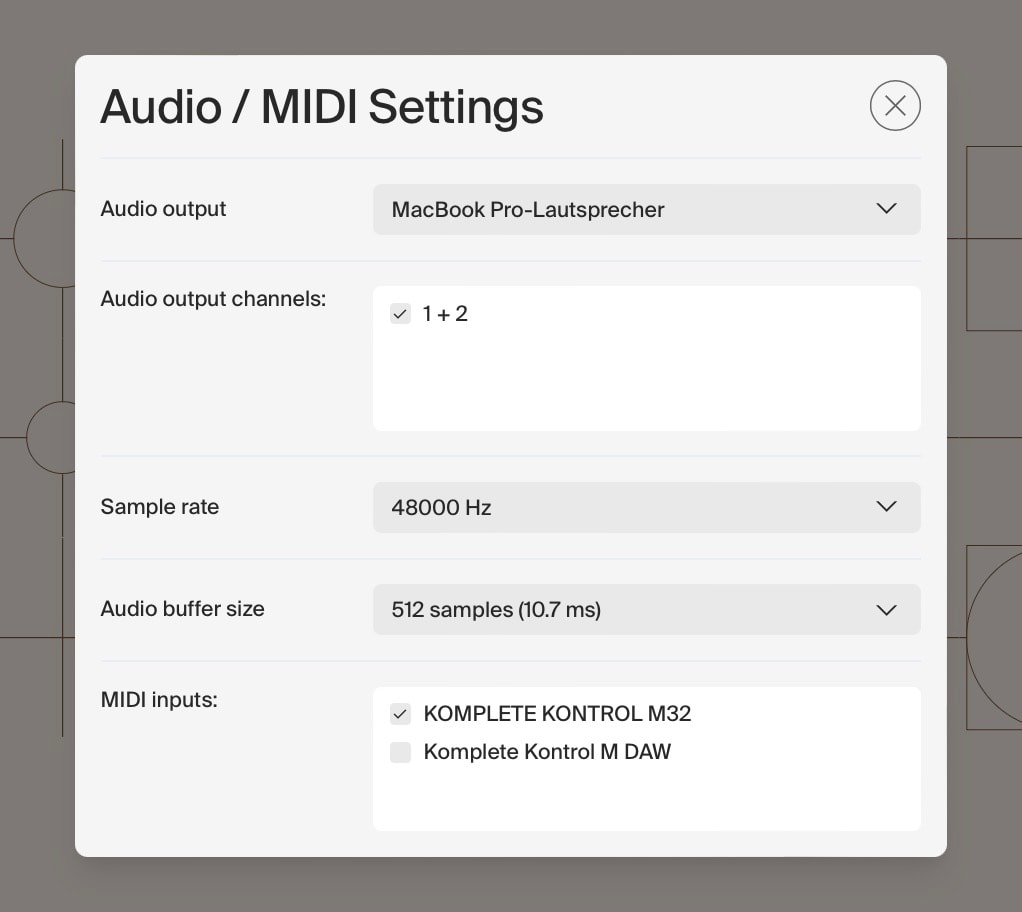
Audio output
Select your audio output device here. Depending on your operating system and connected peripherals, multiple drivers and devices may be available.
On Windows, ASIO drivers will generally give you the lowest latency and best performance.
Audio output channels
If your chosen audio output device offers multiple pairs of output channels, choose the right one here.
Usually that will be the outputs your loudspeakers or studio monitors are connected to.
Sample rate
Choose the sample rate FFOSSO should run at.
44.1khz is CD-quality audio. Most media productions run at 48khz, which is also the sample rate FFOSSO’s content is natively recorded at.
Audio buffer size
The buffer size determines how much time FFOSSO has to calculate audio. Lower values mean quicker reaction to MIDI input, but may lead to higher CPU usage. In most cases, a buffer of 256 works well.
MIDI inputs
Tick which MIDI input devices FFOSSO should listen to for incoming signals.
It makes sense to only check the devices you actually want to use to send MIDI information to FFOSSO to minimize the risk of unwanted inputs.
Depending on how many MIDI devices you have connected to your machine, this list can be very long.