
Reverb
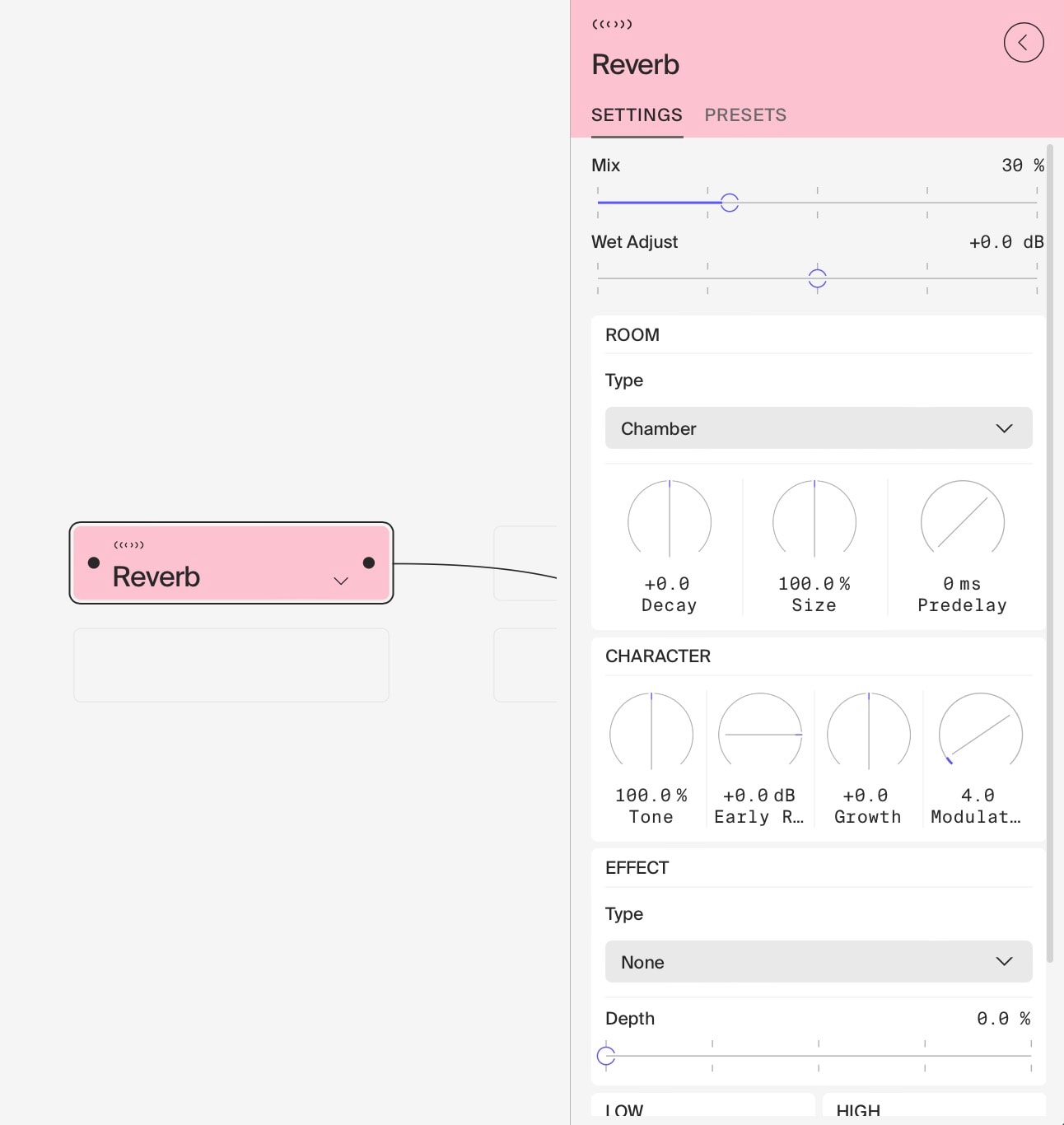
The Reverb module is a highly versatile and powerful tool for creating a wide range of spatial effects, from subtle room ambiences to expansive, evolving soundscapes. It offers deep control over the reverb characteristics, allowing for both realistic space emulation and creative sound design.
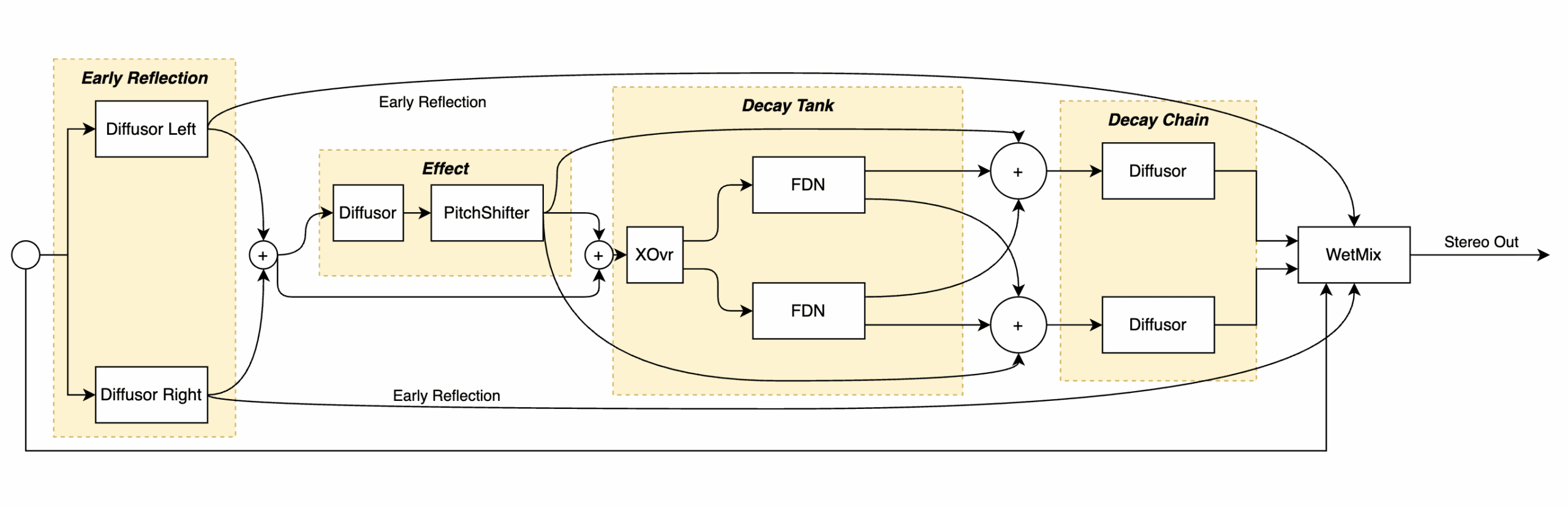
The signal flow of the reverb can be seen in the block diagram below:
Key Components
- Early Reflections: Shapes the initial room character.
- Diffusor: Adds complexity to the reverb tail.
- Decay Tank: Sustains and evolves the reverb tail.
- Effect Chain: Allows for pitch-shifting and other special effects within the reverb.
- Final Decay Chain: Controls the very late reverb tail, useful for slow build-ups.
Main Parameters
- Mix: Blends dry and wet signals (0-100%).
- Early Reflection Level: Controls the prominence of initial reflections (-100dB to +24dB).
- Growth: Adjusts diffusor feedback, affecting reverb density (-100 to +100).
- Extreme values (-100 or 100) significantly thin reflection density.
- Values around 50 delay buildup, while -50 anticipates buildup.
- Size: Modifies the perceived room size (10% to 400%).
- Larger values may create fluttering echoes (use cautiously for effects).
- Decay: Adjusts the length of the reverb tail (-100 to +100).
- Predelay: Adjusts the time between the original signal and the first reflection. 10 milliseconds is equivalent to 3 meters travel time, or being 1.5 meters away from a reflective surface.
- Modulation: Adds movement to the reverb tail (0-100).
- Effect Preset & Depth: Selects and controls special effects like pitch-shifting.
- Tone: Adjusts overall brightness/darkness (10-400%).
- Topos: Selects from various reverb algorithms.
- Low/High Shelving: EQ controls for shaping the reverb’s frequency response.
Note: Most parameters are dimensionless. Trust your ears when adjusting.
Creative Applications
- Realistic Spaces: Use the “Ambient” or “Chamber” topologies for natural-sounding reverbs. Adjust Size, Decay and Predelay for different room characteristics.
- Massive Soundscapes: Experiment with the “Black Hall” or “Slow Tides” topologies. Increase Size and Decay for vast, evolving spaces.
- Shimmer Effects: Select a pitch-shifting Effect Preset (e.g., “Shimmer” or “5th only”) and adjust Effect Depth for ethereal, rising reverb tails.
- Textural Design: Use high Growth values and moderate Modulation to create dense, evolving textures.
- Gated Reverb: Set a short Decay time and experiment with Early Reflection Level for punchy, gated reverb effects.
- Infinite Sustain: Push Decay to its maximum with the “Havoc” topology for near-infinite reverb tails.
- Lo-Fi Ambience: Use the “Dark Hall” topology and adjust Tone for vintage-style reverbs.
- Special Effects: Experiment with unusual Effect Presets like “Eerie” or “Chromazone” for unique, otherworldly reverbs.
- Dual Reverb Processing: Experiment with using two reverb instances in series or parallel for complex spatial effects.
- Pre/Post Processing:
- Try pre-equalisation to shape the input to the reverb.
- Apply distortion after the reverb for unique textural effects.
- 100% Wet Technique: Set Mix to 100% and blend the fully wet signal back into your dry signal for more control over the reverb balance.
Tips for Use
- Start with a preset Room type that’s close to your desired sound, then fine-tune with individual parameters.
- Use the Early Reflection Level to control the perceived distance of the sound source.
- Experiment with Size, Decay and Predelay in tandem to create a sense of space that fits your mix.
- Use Modulation sparingly for subtle movement, or push it for more obvious chorus-like effects.
- The Effect chain can dramatically alter the character of the reverb – start with low Depth values and increase gradually.
- Use the Low and High Shelving filters to shape the frequency content of the reverb, helping it sit better in your mix.
- When using extreme settings, especially long decay times, be cautious of level buildup. Use gain reduction, compression, distortion, or filtering to control the output.
- Don’t be afraid to push parameters to their extremes for creative sound design, but always monitor your levels carefully.
- Experiment with different Topos (topologies) to find the best starting point for your desired sound, then fine-tune with individual parameters.
- Remember that the Growth parameter significantly affects the character of the reverb. Extreme values can create unique, sparse reflection patterns.
- When increasing Size, listen carefully for fluttering echoes. These can be either minimised for a more natural sound or emphasised for special effects.
Advanced Techniques
- Evolving Textures: Automate the Size and Decay parameters slowly over time to create gradually changing spatial environments.
- Rhythmic Reverb: Use a gain (with automation) after the reverb to create pulsating spatial effects that match your track’s rhythm.
- Reverb Layering: Combine short, bright reverbs with long, dark ones to create complex, multi-dimensional spaces.
- Frequency-Dependent Reverb: Use multiple reverb instances with different EQ settings to create frequency-specific spatial effects.
Last updated on