
Delay
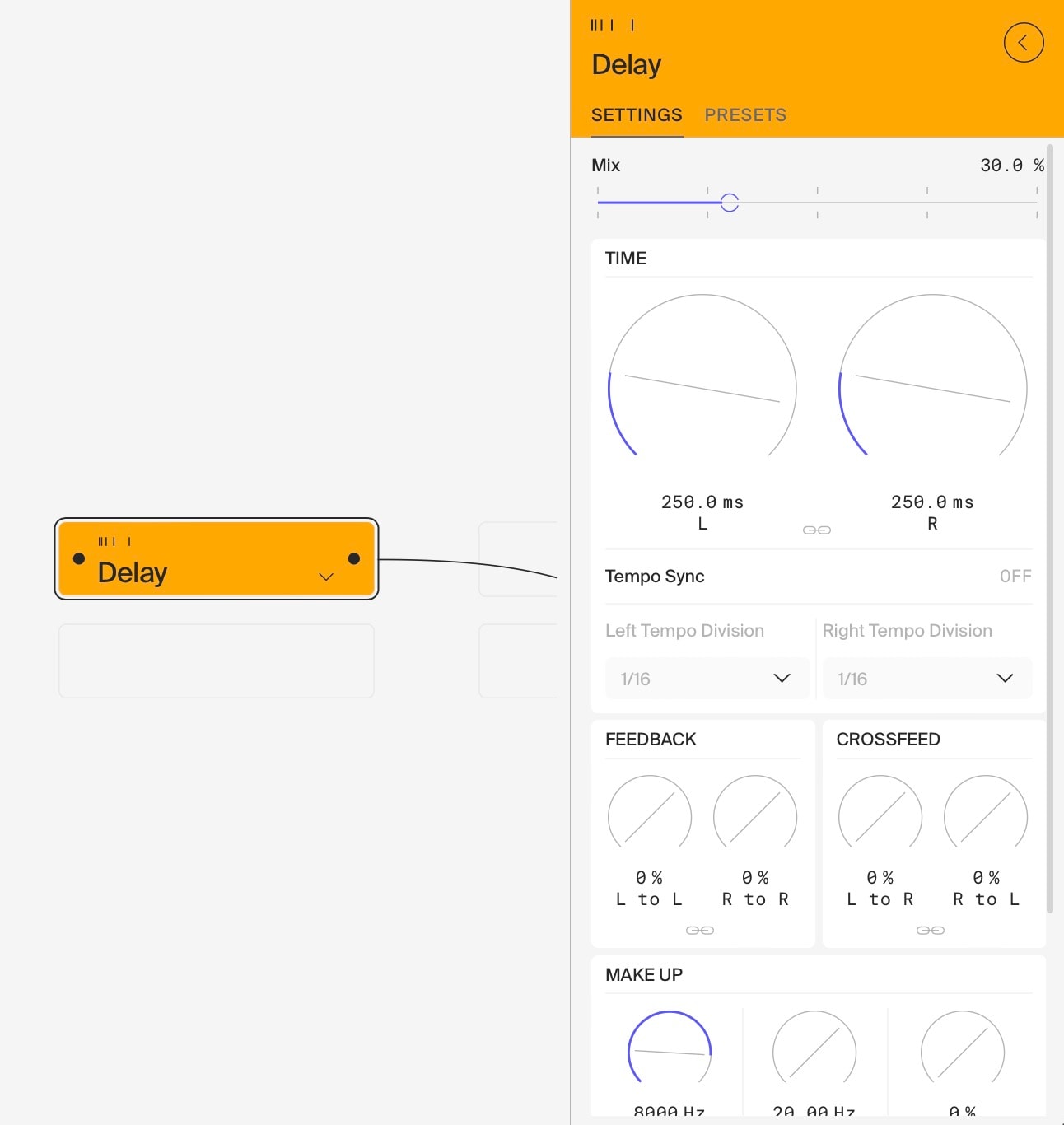
This versatile 2-channel delay offers a wide range of creative possibilities, from simple echo effects to complex, evolving soundscapes. It can create various effects including chorus, flanger, stereo widening, and granular dub. Here’s how to make the most of its features:
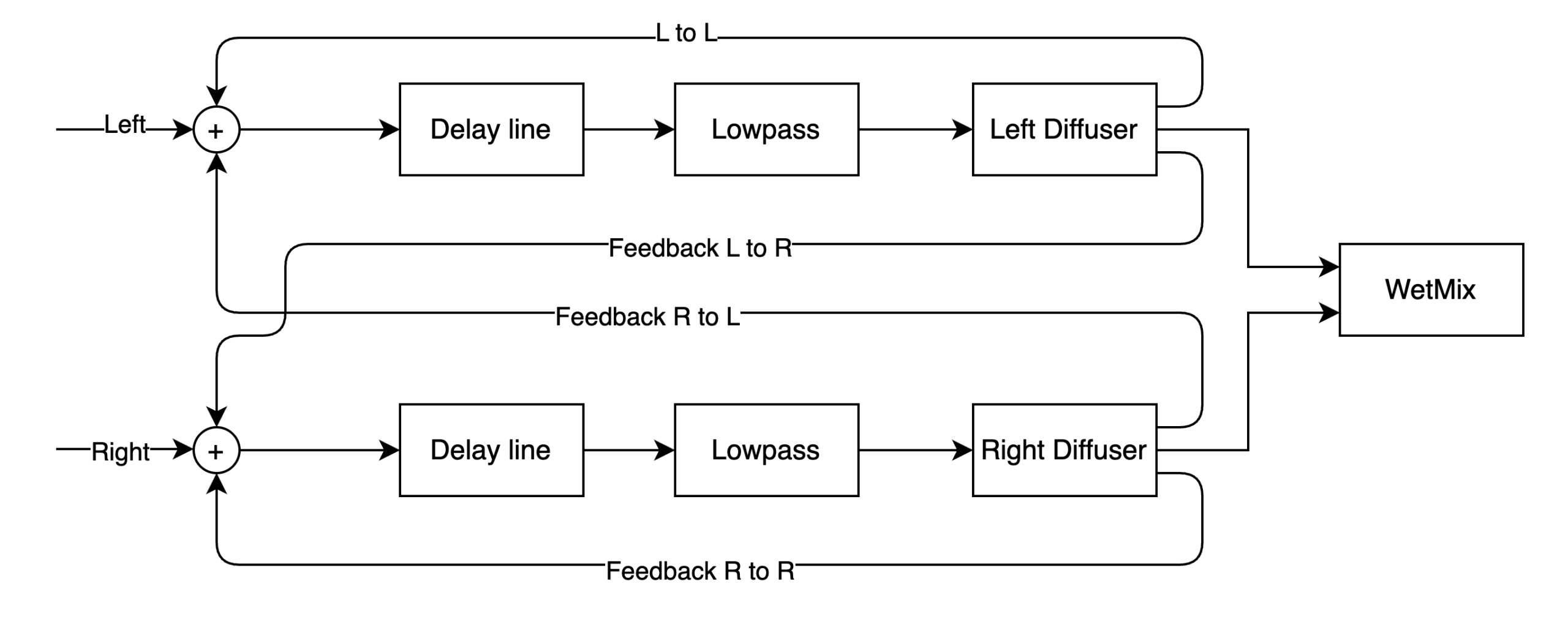
See the block diagram below for an overview of the signal flow inside the delay module:
Basic Operation
- Set Delay Times: Adjust the delay times for left and right channels independently to create interesting stereo effects.
- Feedback Control: Experiment with the four feedback paths (L to L, R to R, L to R, R to L) to create complex, interweaving delay patterns.
- Mix Knob (0-100%): Use the Mix knob to blend the delayed signal with the dry signal. This is especially important for achieving the desired effect when creating chorus sounds. A lower mix setting will produce a subtle effect, while a higher setting will emphasise the delay, making it more pronounced.
- DAW Synchronisation: The delay can be synchronised to the tempo of your DAW, allowing for precise timing that matches your project. This feature is essential for creating rhythmic effects that lock in with your music.
Creating Specific Effects
- Chorus: Set short delay times (10-50ms) with moderate modulation depth and speed. Adjust the Mix knob to balance the wet and dry signals, enhancing the chorus effect without overwhelming the original sound.
- Flanger: Use very short delay times (1-10ms) with moderate to high feedback. Set a slow to moderate modulation speed and adjust the depth to taste. The Mix knob is crucial here – start around 50% and adjust for desired intensity. The feedback amount will determine the resonant peaks characteristic of flanging.
- Stereo Widening: Set different, very short delay times for left and right channels (e.g., 1-30ms). Use cross-channel feedback to enhance the stereo image. Adjust the Mix knob to ensure a balanced sound. These short times create a sense of width without introducing noticeable echo. Look up Haas effect for further details.
- Granular Dub: Use short delay times with high feedback and modulation for glitchy, granular textures. The Mix knob can help you control the intensity of the effect.
Advanced Techniques
- Filters: Utilise the low-pass and high-pass filters to shape the tone of your delays. This can help them sit better in a mix or create unique textural effects.
- Diffusor: The chained Schroeder allpass diffusor can add richness and complexity to your delays. Experiment with different settings to create everything from subtle thickening to dense, reverb-like textures.
- Modulation: Adjust depth and speed to add movement to your delays. Subtle modulation can add warmth, while extreme settings can create wild, pitch-shifting effects.
Caution and Creative Use of Feedback
The feedback parameters can push the delay into self-oscillation, creating infinite sustain or even potentially dangerous sound build-up. While this has been mitigated in recent updates, it’s still important to use caution:
- Start with lower feedback settings and increase gradually.
- Monitor your output levels closely when experimenting with high feedback.
- Use the “danger zone” creatively but responsibly – it can be a source of unique textures and drones when controlled carefully.
Tips for Experimentation
- Experiment with transitioning between effects. For example, slowly increase the delay time to morph from a flanger to a chorus effect.
- Try routing different sound sources to each channel for complex, evolving textures.
- Automate parameters like delay time, feedback, and Mix for dynamic, shifting effects.
- Combine with other effects (like distortion) in your signal chain for even more sonic possibilities.
- Experiment with using multiple delays in parallel or in series for a variety of soundscapes.
Last updated on